
Highlight #1 What is Version Control?
Version control is a system that records changes to files or a set of files over time so that you can recall specific versions later. It is one main repository for all of the project files. Version control systems allows you to revert files back to a previous state, revert the entire project back to a previous state, compare changes over time, see who last modified something that might be causing problems, who introduced an issue and when, and many more things. I find this topic interesting because I believe it is such a smart creation that makes designers and developers lives easier. This topic relates to this class because if we were to make an error during the process or lose the files, it would be easy to recover, which is very helpful and can relieve a lot of stress for beginners in coding and web application development. I have had many situations where files were deleted or lost while working, and this type of system would have helped me greatly.
Highlight #2 Benefits of Version Control
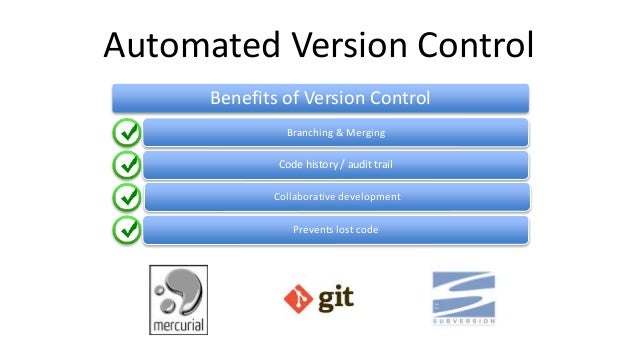
Version control provides creators many benefits. It allows team members to check out files, make changes, and then check them back in. This makes file sharing very simple. VCSs make sharing so much easier because you do not have to worry if you copied the newest version because VCS does it for you. It automatically notes which individual changed the files, at what time they were changed, what is different and the changes made to the files, and merges all changes to the same file. Version control also provides automatic backups, doesn’t allow files to be overwritten, and is in a common repository that holds all the latest files. It allows for seamless file sharing where people can work on the same files simultaneously. VCS also allows you to maintain different versions of a file, so you can avoid clutter from forming due to saving multiple copies of one file with various names. This system is very beneficial to any business where multiple employees are collaborating on a project or even students in college who are working on an assignment. Version control also allows you to revert back to older versions and backs up files even when working solo. This topic is interesting because with one creation, it seems to solve so many problems that people face daily. I also see the huge value it provides to companies with many employees working on one project by allowing improved collaboration and efficiency. This topic is relevant to the class because as we continue to learn in this course, we will inevitably make mistakes and version control can save us from our own errors and save us on time.

Highlight #3 Remote vs Local Repository
There are two types of repositories: remote and local. A remote repository is a repository that resides on a remote server that is shared among multiple team members. A local repository is a repository that resides on a local machine of an individual user. A local repository can be created by forming a brand new repository or by cloning an existing remote repository onto your local machines. This topic interests me because I was not aware there were different types of repositories. I like the idea that you do not need to connect to a central repository, but can access your own work even if you do not have internet, and can later push your changes to another repository once you are connected again. I like the freedom associated with these concepts. This is related to this class because it provides us with the flexibility to do work wherever, and also shows us the freedom that this type of work allows.

Highlight #4 What is Git?
Git is a free and open source distributed version control system designed to handle everything from small to very large projects with speed and efficiency. It is very simple to learn and although it has a tiny footprint, it has an extremely fast performance. Git uses the idea of a local repository where every user has a complete copy of the repository stored locally on their machine. It allows for you to work completely offline and share changes later. There is also no single point of failure and will prevent an unintentional overwrite of a file on the shared repository. Git allows processes to run faster. Git interests me because it thinks of data differently from other VCSs. Git doesn’t think or store data as a list of file-based changes, but thinks of it more like a stream of snapshots. Every time you save the state of your project, it essentially takes a snapshot of what the file looks like. I think this is relevant to this course because it is important to understand the differences in systems and what works best for us so we can utilize these tools and systems in our future career and courses.
Highlight #5 Git’s Three Main States and Sections
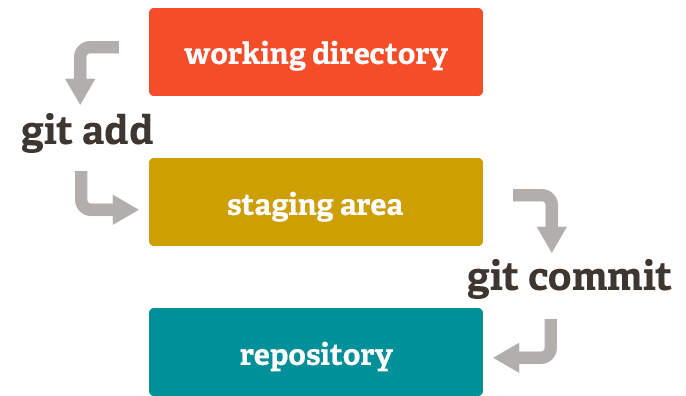
There are three main states that Git has that your files can reside in. These states are committed, modifies, and staged. The committed stage means that the data is safely store in your local database. Modified means that you have changed the file, but have not committed it to your database yet. The staged state means that you have marked a modified file in its current version to go into your next commit snapshot. There are also three main sections of a Git project. These include the Git directory, the working tree, and the staging area. The Git directory is where Git stores the metadata and object database for your project. This is what is copied when you clone a repository from another computer, making this the most important part. The working tree is a single checkout of one version of the project meaning that these files are pulled out of the directory and placed on your disk for you to modify. The staging area is a file that stores information about what will go into your next commit and is also referred to as the “index.” This topic interests me and relates to the course because it helps me further understand Git and allows me to understand the different processes and steps that exist within this system. It breaks it down into simple components, making it easier to understand and allows you to make a mental picture to map out how it functions.